

Ok, first some background.
My mom has been using Excel since she got her current job as an Accounts Payable clerk in the early 2000’s. I began using Excel at a co-op job in 2013. But it wasn’t until I was living with my parents during the pandemic that I saw how differently we used Excel.
One day I asked my mom if she wanted to go on a walk with our dog and she said she needed to spend the rest of the day reconciling data and didn’t have the time. She had 2,500 invoice rows in a document and she had to reconcile data between her internal system’s export and a document the vendor provided.
I then watched as she hit ‘Ctrl + F’ and searched for an invoice number between two sheets and then for those that matched dollar amounts, she highlighted the row Green and put a separate column with the word ‘matched. Anywhere that they didn’t match, she would pull up the calculator app on her laptop and manually enter the difference in a separate column.
This was an eye-opener, but realistically, how a significant portion of the white collar workforce use spreadsheets today. With a few minutes of writing a formula, this five hour task could be compressed into under 30 minutes. It wouldn’t matter how ‘perfect’ or ‘efficient’ that formula field was; it would get the job done and she could move to another, more productive and mentally rewarding piece of work.
What Does this Mean for Knowledge Workers Today
This is analogous to how I’ve thought about the impact of AI for our workforce. There are tasks that we do today that when we look back at in 5 years, will feel the equivalent of me watching my mother manually searching records across 2,500 rows.
One of the ways I’ve spoken about using AI at work for my team is the concept of “disposable software” use cases – using AI to build something that doesn’t need to be scalable, or built with the security standards of an enterprise application. Instead, it’s purpose built for a very specific use case, hosted locally on their laptops, and can be something they can iteratively work on for 15 minutes to help save hours if not days of their time.
An example came up recently that required us to reference the client’s Azure DevOps Tracker, reviewing almost a thousand tickets and test scripts and hours of workshop recordings. This normally would require a team member to be fully allocated for an entire week to complete. When I hear things like ‘ X hours of manual work’ – my ears immediately perk up. My immediate thought was not ‘how can we push back on the client and tell them it’s not possible?’ – instead it was ‘how can I use AI to solve this?’
Typically, my first thought with AI is either NotebookLM or Gemini. However, with the size and scope of the deliverable, I realized I would need to create a custom application for my exact use case. I opened up Cursor (I haven’t ever closed it), and began working on a prompt starting with the direct ask from the client. The application was a single webpage I can open from my desktop – no hosting, or authentication requirements. The app allowed the upload of the Azure DevOps export as a csv, a zip file of the hundreds of spreadsheet, Word documents and videos. I also asked Cursor to install a Gemini model locally so that I could use AI capabilities to take the parsed files and use its logic to create the output in the specific format the project required. . The application then took the Gemini updated details and exported it in a spreadsheet format.
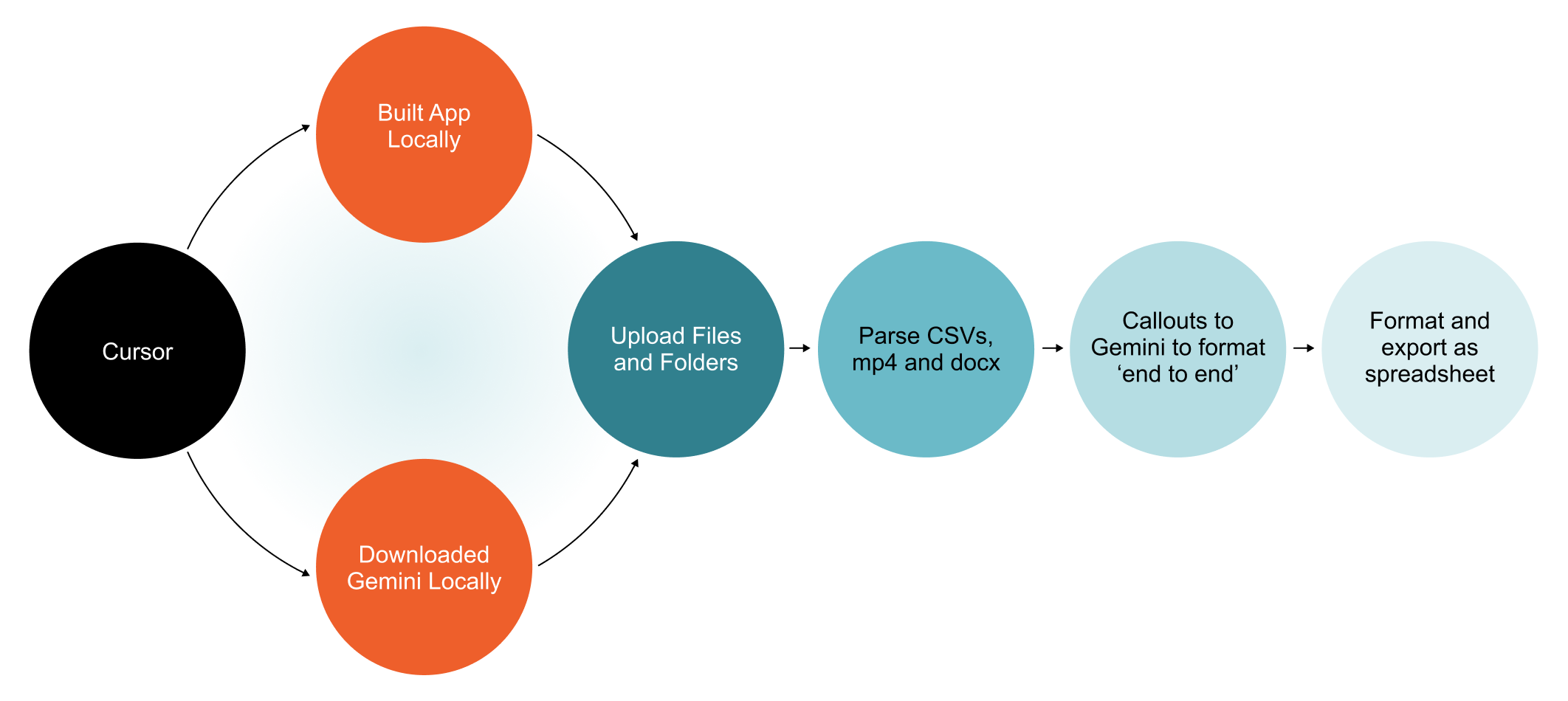
This entire process took 15 mins from beginning to end. Add another 45 minutes for the BA on the team to spot check five(5) items for accuracy and something that was expected to take 40 hours, was done in just one.
The hardest part of the AI transition isn’t learning how to prompt; it’s recognizing our own blind spots. My mom didn’t know she was working inefficiently, instead, she felt she was just working hard.
We are all currently blind to our own modern-day equivalents of manual row-matching.
My challenge to all of my team members has been ‘find your 2,500 rows’. This means to find the repetitive, manual task that drains their afternoon, and instead of pushing through it, take 15 minutes to ask an AI tool to build you a throw-away solution. It doesn’t have to be pretty. It doesn’t have to be scalable. It just has to work once.
Because at the end of the day, efficiency isn’t just about doing more work. It’s about getting the job done so you can take a break, step away from the screen, and go take your dog for a walk.