

Salesforce shipped a first-party MCP server for Marketing Cloud Engagement (MCE) in May 2026, and LinkedIn promptly lost its mind over it. Every other post is a breathless demo of an agent building a journey from a one-line prompt. So before you wire one up to your production tenant: hold your horses, buddy. The technology is genuinely useful and worth adopting. The point of this piece is not “don’t use it.” The point is understand it, then use it wisely, because SFMC punishes mistakes in ways core CRM does not.
The framing in Salesforce’s own launch material is exactly right: an MCP server is a bridge, not a brain. It translates an AI assistant’s intent into MCE API calls, and the official overview is admirably blunt that AI assistants can produce inaccurate or harmful results and that you own the outcomes. That honesty deserves matching guardrails.
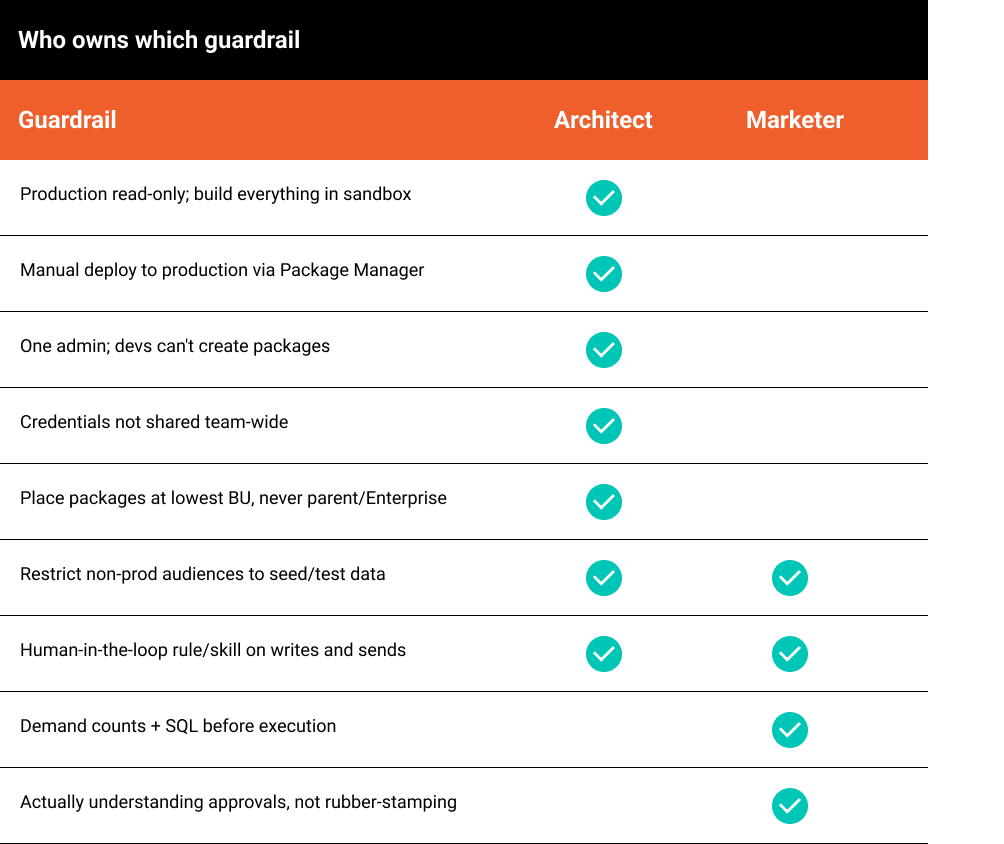
This piece is for two audiences. Architects need to understand why SFMC is a uniquely unforgiving place to point an autonomous agent, and which controls actually contain it. Marketers need to know which guardrails they personally own day to day. The short version: Salesforce’s prevention story is decent, its attribution story in SFMC is weak, and the scope model has a side door most of the launch commentary has not mentioned.
Why SFMC is higher-stakes than core CRM
A bad write in Sales Cloud is usually recoverable; you fix the record. SFMC does not work that way. A send is irreversible: once an email leaves, there is no undo, no rollback, no recall. A bad SQL query against a multi-million-row data extension overwrites silently. Subscription and consent state changes carry CASL and CAN-SPAM exposure, not just data-quality risk. And in a multi-business-unit tenant, the blast radius of a single mistake spans every BU the running identity can reach.
An agent is fast, tireless, and does not understand consequences. That combination is the entire reason guardrails are not optional friction here. They are the thing standing between you and an irreversible send to two million real people.
The guardrails Salesforce gives you, and their limits
- Scope intersection via Installed Package OAuth. The MCP server authenticates as an Installed Package, and the agent’s effective permissions are the intersection of the package’s scopes and the user’s. If the package has no send scope, the agent can’t send through the MCP API. This is a real control, and it’s the right foundation.
- Destructive-operation annotations. Salesforce flags destructive tools (sends, deletes) so a well behaved model can surface them before executing. Useful, but advisory. It relies on the model choosing to pause.
- “Preview before execute.” Salesforce recommends asking the assistant what it will change, how many records are affected, and to show the SQL first. Also advisory, and only as good as the human reading it.
The pattern across all three: prevention at the front door is solid; everything downstream depends on the model and the human behaving well. That is where the rest of these guardrails come in.
A practical guardrail framework
Platform controls (the architect’s layer)
Split packages by job; never build one god-package. A single package with broad scope is the easiest mistake to make and the hardest to walk back. Instead, create narrowly scoped packages, one per function, and decide deliberately where each one lives. The model that contains the most risk: build everything in sandbox, give production a read-only package only, and promote anything that must run in production by hand through Package Manager so a human sits in the middle of every deployment.
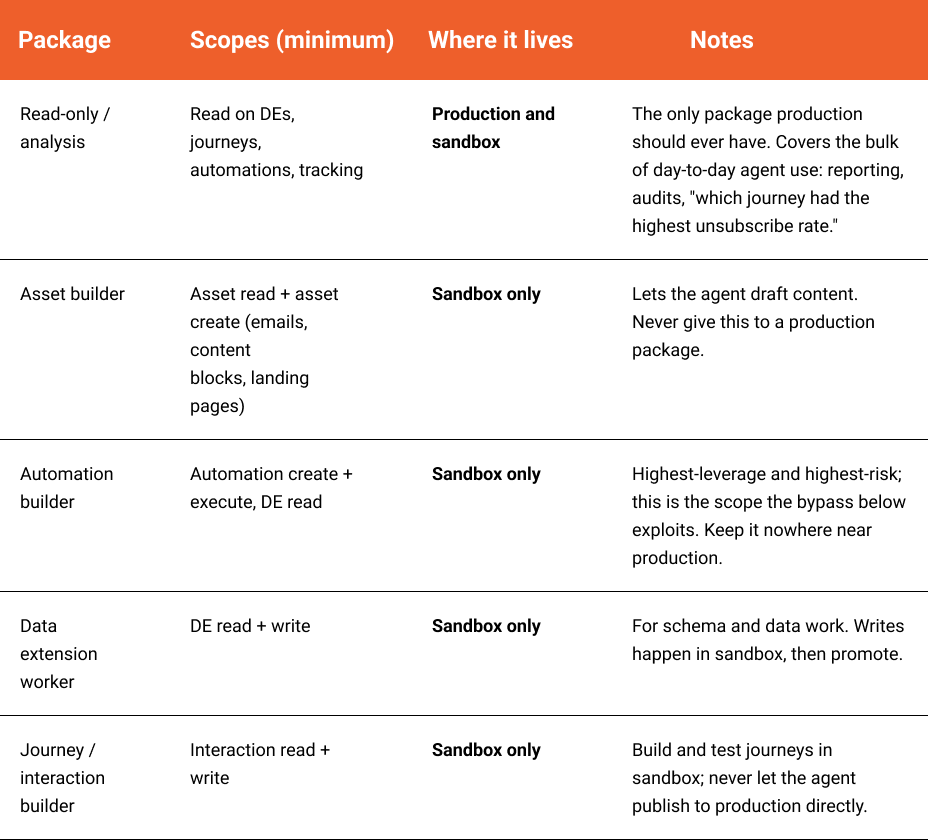
The rule underneath the table: production carries read-only,full stop. Everything that creates, updates, or executes is built and tested in sandbox, then a human deploys it to production via Package Manager. That manual promotion is your man-in-the-middle: the agent can propose and assemble, but a person decides what actually reaches the live tenant.
Lock down who can mint packages. This is where most tenants quietly fail. Most SFMC BUs never maintain roles properly, so every developer ends up an admin, which means every developer can create Installed Packages and wire up an MCP server with whatever scopes they like. That should not be the case. There should be one admin. Developers should not be able to create Installed Packages at all. Permission hygiene is not bureaucracy here; it is the control everything else leans on.
Don’t share credentials team-wide. An Installed Package’s client ID and secret are the keys to whatever that package can do. If five developers share one package’s credentials, you have destroyed attribution before a single action runs; no log can tell you which human prompted what. Treat MCP credentials as you would any production secret: scoped, minimal, and not pasted into a shared doc.
Understand that there is no hard stop on sending. This is the uncomfortable truth, and it is worth being precise about because it is easy to get wrong. SFMC sandbox and production typically share the same send account (SAP) and sending infrastructure. A sandbox in SFMC is not an isolated environment the way a Sales Cloud sandbox is; there is no separate non production mail tier. An email triggered from a “sandbox” BU goes out for real, to real inboxes, over the same sending reputation. So you cannot architecturally guarantee that a non production send will not reach a real person.
Withholding send scope from a package lowers the odds an agent triggers a send through the MCP API, but it does nothing about the bypass described below and nothing about the shared SAP. Exclusion Lists suppress specific addresses but do not stop the send itself. None of these is a backstop. The only things that actually limit blast radius are operational: keep non-production audiences restricted to seed and test data only, and require human approval on anything that sends. You cannot control the infrastructure, so you have to control the audience and the approval.
Operational controls (everyone’s layer)
Mandate human-in-the-loop on every write, as a rule, not a hope. Salesforce’s “preview before execute” depends on the model deciding to ask. Turn that into an explicit instruction: a rule or skill file that mandates every write or destructive tool call pause for explicit human approval before execution. This is the layer marketers can own directly, and it is the one that turns “the model usually asks” into “the model is instructed never to write without a human acknowledgment.”
Be honest about what this is: a control, not a wall. A skill can be ignored by a model or stripped by a determined user. And it only works if the human actually understands what they are approving rather than rubber-stamping, which matters enormously for the bypass described next.
Demand counts and SQL before anything runs. No write without the agent first stating record counts and showing the exact query. No autonomous loops on production.
The bypass that breaks “if the package can’t write, the agent can’t write”
Here is the part the launch posts miss, and it is the most important thing in this article. The scope model governs what the MCP API session can do directly. It does not govern what code the agent writes and then gets executed inside SFMC’s own runtime.
The script-context bypass. Suppose a package has the automation create and execute scopes but no asset or journey scope. The agent can author a Script Activity containing SSJS that creates an email, a landing page, or a journey via WSProxy, and then run it. The script executes in
SFMC’s runtime with the privileges of whatever invokes it, not within the MCP package’s declared scopes. The same is true for a published CloudPage, which runs under the asset create scope used to build landing pages. So “if the package can’t write, the agent can’t write” is false the moment the agent has asset create or automation create-and-execute scope. That is a full bypass, and it needs no human in the loop.
The cross-BU question. Business units add a wrinkle. SSJS WSProxy exposes setClientId({“ID”: targetMID}) , which switches the execution context to another BU’s MID; from there a script can run Create, Update, or Delete against that MID. The worry is that a package scoped to one BU could pivot into another and act there.
The platform enforces the hierarchy, and this bounds the risk. The pivot is gated by the running identity’s reach in the BU tree, not by the package’s declared scopes. A parent BU reaches down into its children by design, so code running under a parent or Enterprise identity can pivot into any child below it. The reverse does not work: code running in a child BU cannot pivot up to the parent or sideways to a sibling. The platform denies it.
The practical translation is the line every architect needs to internalize: if the MCP Installed Package has access to a parent BU, it can reach every child BU beneath it, even though the package was never given explicit scope to those child BUs. A package created at the parent or Enterprise level effectively scopes the agent to the entire tree. A package created at the lowest necessary BU is contained, because the platform will not let it climb. The fix is concrete: place MCP packages at the lowest BU in the hierarchy, never at Enterprise or parent. Combined with the role hygiene above, the cross-BU concern largely closes itself, because Salesforce enforces it for you.
The attribution gap
Salesforce’s reassurance that the human’s name appears in the audit trail describes core-CRM identity propagation. SFMC is different. The MCP server authenticates as the Installed Package’s API user, so API-triggered actions are commonly attributed to that integration identity, not the individual who prompted the agent. SFMC’s logging is also fragmented: Audit Trail must be deliberately enabled, is retention-limited, and must be exported via SFTP or Data Extract to retain history; journey audit logs live behind a separate per-journeyAPI. There is no single, complete, queryable “who did what” surface.
Compensating controls help: schedule Audit Trail extracts to a DE or SFTP, poll journey audit logs, and layer external monitoring on automations and sends. But the honest takeaway is that SFMC gives you weak forensics after an agent error, which is precisely why prevention and human-in-the-loop matter more here than in CRM.
The bottom line
The MCP server is a useful tool, and Salesforce built reasonable front-door controls. Use it. Just understand what it does and does not protect. Scope intersection only guards one door: agent authored code running in SFMC’s own runtime executes outside the package’s declared scopes, so “if the package can’t write, the agent can’t write” is false the moment the agent can create and execute automations or build CloudPages. BU isolation does hold, so a package placed low in the hierarchy cannot climb; the risk is minting packages at the parent or Enterprise level. And because sandbox and production share the same sending infrastructure, there is no platform stop on an accidental real send, which puts the entire weight on audience control and the human in-the-loop rule. The agent will never understand that a send is forever. Your guardrails have to. Hold your horses, then build something good.