

Salesforce’s front-end architecture evolved from Visualforce, to Aura Components, and finally to Lightning Web Components. But historically, integrating industry-standard JavaScript frameworks like React, Angular, etc., into Salesforce required aggressive workarounds. Developers had to compile code, compress it into static resources (zip files stored on Salesforce), and surface it via Visualforce pages or Lightning Out. The alternative was hosting the application off-platform on Heroku or AWS, which required wiring up complex OAuth flows. This resulted in fragmented security models, broken session management, and a terrible Developer Experience.
The Shift: Salesforce Multi-Framework
That compromise is over. Salesforce Multi-Framework is a framework-agnostic runtime environment that allows developers to build and run native Salesforce applications using industry-standard UI frameworks like React, introduced at TrailblazerDX (TDX) 2026. It bridges the gap between the proprietary Salesforce development environment and the broader web development ecosystem. Because it runs directly on the Agentforce 360 platform, it natively integrates Salesforce’s authentication, security, governance, and data integration capabilities—completely eliminating the need to set up iFrames or Canvas Apps. It is a core front-end pillar of the broader Headless 360 initiative.
The Development Lifecycle: Running React Natively on Salesforce
With Multi-Framework running natively on the platform, the developer experience bridges the gap between standard React application design and native Salesforce DX workflows.
1. Understanding the Metadata Structure (UI Bundles)
Salesforce treats the entire React project as a new metadata type called a UI Bundle.
When building a Multi-Framework app, it lives natively within the Salesforce DX project directory under a dedicated folder structure. Here is a look at how that directory lays out using a simple Product Catalog App as an example:
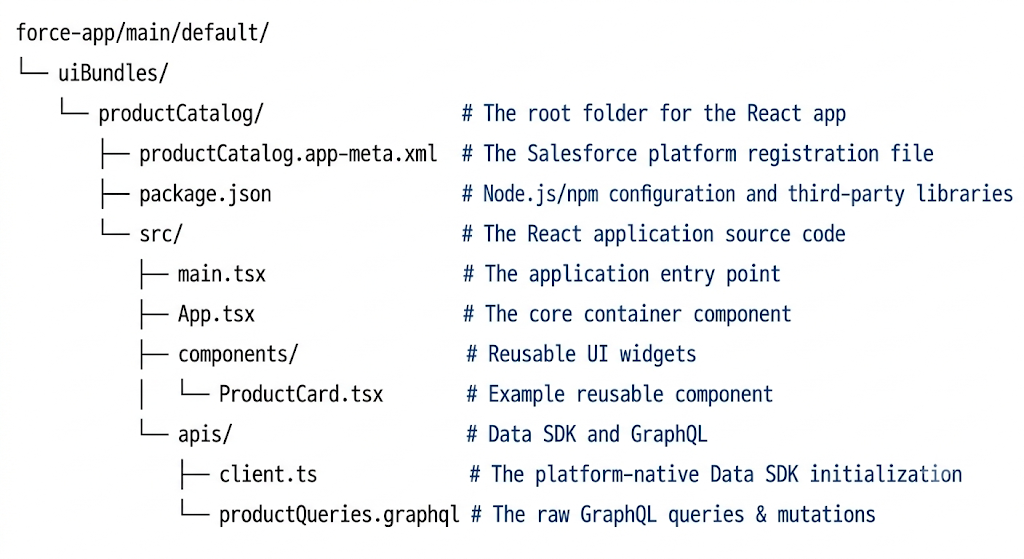
- productCatalog.app-meta.xml: This configuration file tells the Salesforce platform that this specific folder is a native React application rather than an LWC, allowing it to register securely with the Salesforce runtime.
- package.json: A standard Node.js file listing the open-source libraries the React app depends on (like Tailwind CSS or external chart engines). Salesforce reads this to build the application on its core servers.
- src/apis/client.ts: The foundational bridge where the frontend establishes its connection. By importing the platform-native @salesforce/sdk-data package, it automatically identifies the active user session and establishes an authenticated context without token management.
- src/apis/productQueries.graphql: A plain-text file containing the standard GraphQL queries. For example, pulling live data from a custom object directly into React views
2. How It Runs on the Platform
Multi-Framework hosts and renders React applications directly on Salesforce core application servers. Once deployed, the React app sits side-by-side with Lightning Web Components (LWCs) and can be surfaced directly within the Salesforce App Launcher. It completely bypasses the need for external hosting, middleware, or brittle API configurations.
3. Build, Test, and Deploy Workflows
- Build: Development begins locally in VS Code using Node.js and the Salesforce CLI. By installing the UI Bundle Dev Plugin via the CLI, spin up a local development server to preview changes in real-time. Because it uses standard React, developers can instantly install and utilize any open-source libraries, frameworks, or custom npm packages.
- Test: For unit testing, teams can rely on standard open-source web ecosystems like Jest and React Testing Library. For end-to-end data validation, developers test directly against active Scratch Orgs or Sandboxes.
- Deploy: The migration path follows standard Salesforce DX. When app code is ready to compile the React source and deploy the entire UI Bundle folder directly to target org using the standard CLI command: sf project deploy start
4. Data Access, Security, and Governance
The most defining architectural benefit of Multi-Framework is how a React component handles data without custom middleware.
- The GraphQL Layer: Multi-Framework leverages platform-native GraphQL for data orchestration. Rather than writing custom Apex controllers for basic CRUD, developers use the GraphQL API to query and mutate records directly from the frontend.
- Zero-Token Authentication: By invoking createDataSDK() from the native library, the application automatically inherits the session context of the active, logged-in Salesforce user. There is absolutely no OAuth token management, connected app configuration, or session refresh logic required from the developer.
- Enforced Governance: Because the React runtime is embedded natively within the core platform layer, every single GraphQL query and mutation strictly adheres to the org’s sharing rules, Object-Level Security (CRUD), and Field-Level Security (FLS).
Adapting React for LWC Developers
If background is strictly in Lightning Web Components, adopting Multi-Framework is essentially an exercise in mapping familiar design concepts to React-specific syntax:
| Concept | Lightning Web Components (LWC) | Multi-Framework (React) |
| Component Layout | Split into individual .js, .html, and .css files. | Combined into a single file using JSX (HTML embedded in JS). |
| Data Reactivity | Managed via the declarative @wire service adapter. | Managed using the custom React state hook: useState. |
| Page-Load Logic | Executed inside the native connectedCallback() lifecycle hook. | Executed inside a useEffect() hook with an empty dependency array. |
| Data Layer Imports | Imported directly via @salesforce/apex or lightning/uiRecordApi. | Imported via the platform-native @salesforce/sdk-data library. |
LWC vs. React: Decision Matrix
Multi-Framework isn’t a replacement for LWC; it’s an expansion of the toolkit. Knowing when to apply each framework is a critical architectural decision.
When to Choose React
- Leveraging External Talent: When the engineering team already possesses deep, specialized React expertise, allowing them to build Salesforce apps instantly without learning a proprietary framework.
- Rich Ecosystem Requirements: When the user interface requires highly complex, open-source npm packages, specialized data-visualization libraries, or sophisticated React component design systems.
- Cross-Platform Portability: When the designing components or micro-frontends are intended to be shared natively across Salesforce surfaces and non-Salesforce web applications alike.
When to Choose LWC
- Salesforce Native Proficiency: When internal teams are already highly proficient with native Salesforce development paradigms.
- Declarative Speed: When the design relies heavily on Lightning Data Services, quick record layouts, or out-of-the-box base lightning components.
- Admin Customization: When components must be exposed directly to the Lightning App Builder. (since React components do not support this yet)
Current Considerations & Limitations
Multi-Framework is currently in its open beta phase. Here is where the platform limits stand today:
- Environment Constraints: Multi-Framework features are only available in Scratch Orgs and Sandboxes where English is set as the default language. Beta applications cannot be deployed to Production environments, Developer Edition orgs, or Trailhead Playgrounds yet.
- Framework Coverage: React is the only third-party framework supported at this time.Component Architecture: Full micro-frontend support—which will allow developers to embed these custom React components directly inside an existing LWC container—is still in Developer Preview.
- Component Architecture: Full micro-frontend support—which will allow developers to embed these custom React components directly inside an existing LWC container—is still in Developer Preview.
Conclusion: A New Era for Salesforce Front-End Architecture
The introduction of Salesforce Multi-Framework represents a fundamental shift in how system architects and development teams approach enterprise application design. By breaking down the silo between proprietary Salesforce languages and the broader web development ecosystem, Salesforce is dramatically lowering the barrier to entry for modern web developers.
Organizations no longer have to choose between the sheer agility of the React ecosystem and the ironclad data governance of the Salesforce platform. While LWC will remain the cornerstone for heavily declarative, admin-configured components, Multi-Framework unlocks the ability to build highly complex, customized, and portable user interfaces without the technical debt of off-platform hosting. As this framework moves from beta to general availability, it will undoubtedly become an essential pillar in every Salesforce Architect’s toolkit.