

A landing page with a phone-number field and a checkbox feels like consent. To an SMS aggregator, it isn’t. One MobileConnect API call can fix that, without touching a single thing about the actual send.
The problem we had was a promotional landing page that collected a name, an email, and a mobile number, with a consent checkbox underneath. On submit, the page wrote the number into a Data Extension with a status field flipped to “opted in.” A later scheduled import read that Data Extension and subscribed the number to a MobileConnect keyword, which is what actually made the number sendable.
Nothing about that flow proves the person who typed the number is the person holding the phone. An aggregator brokering the short code eventually caught it: web and app-based phone capture has to be double opt-in, meaning the phone, not the form, has to confirm.The keyword was suspended, outbound stopped, and the fix had to happen before the aggregator would even retest the page.
Why “just enable double opt-in” doesn’t fix it
MobileConnect’s Double Opt-In template is designed around a real inbound text: someone texts a keyword to a short code, MobileConnect replies asking them to confirm, and a YES reply flips them to Subscribed. That’s clean when the entry point is a text message. It doesn’t obviously work when the entry point is a web form, because a form never generates the inbound message MobileConnect is waiting to react to.
The naive fixes don’t hold up: Journey SMS can’t do it (a Journey sends to contacts who are already subscribed; it can’t perform the opt-in).. A dedicated web-only keyword avoids the immediate problem but creates a background-sync job to move confirmed contacts onto the real send keyword, which just relocates the “was this really them” question. And letting the existing import keep subscribing people is the original hole, relabeled.
QueueMO: making the API believe a text was just sent
The mechanism that closes the gap is a MobileConnect REST endpoint, POST /sms/v1/queueMO. MO stands for mobile-originated. This endpoint lets a backend system queue a synthetic inbound message on someone’s behalf, as if that phone number had just texted the keyword to the short code.
That’s the whole trick. QueueMO against a Single Opt-In keyword just subscribes the number immediately with no YES step, reproducing the exact violation with an extra API call in front of it.From there, the aggregator-approved Double Opt-In flow takes over: confirmation SMS out, contact held In Progress, and a YES typed from the handset is the proof of possession the form could never provide.
One sequencing detail matters more than anything else: the keyword has to already be Double Opt-In before QueueMO goes live on the page. QueueMO against a Single Opt-In keyword just subscribes the number immediately with no YES step — reproducing the exact violation, with an extra API call in front of it.
What the build actually looks like
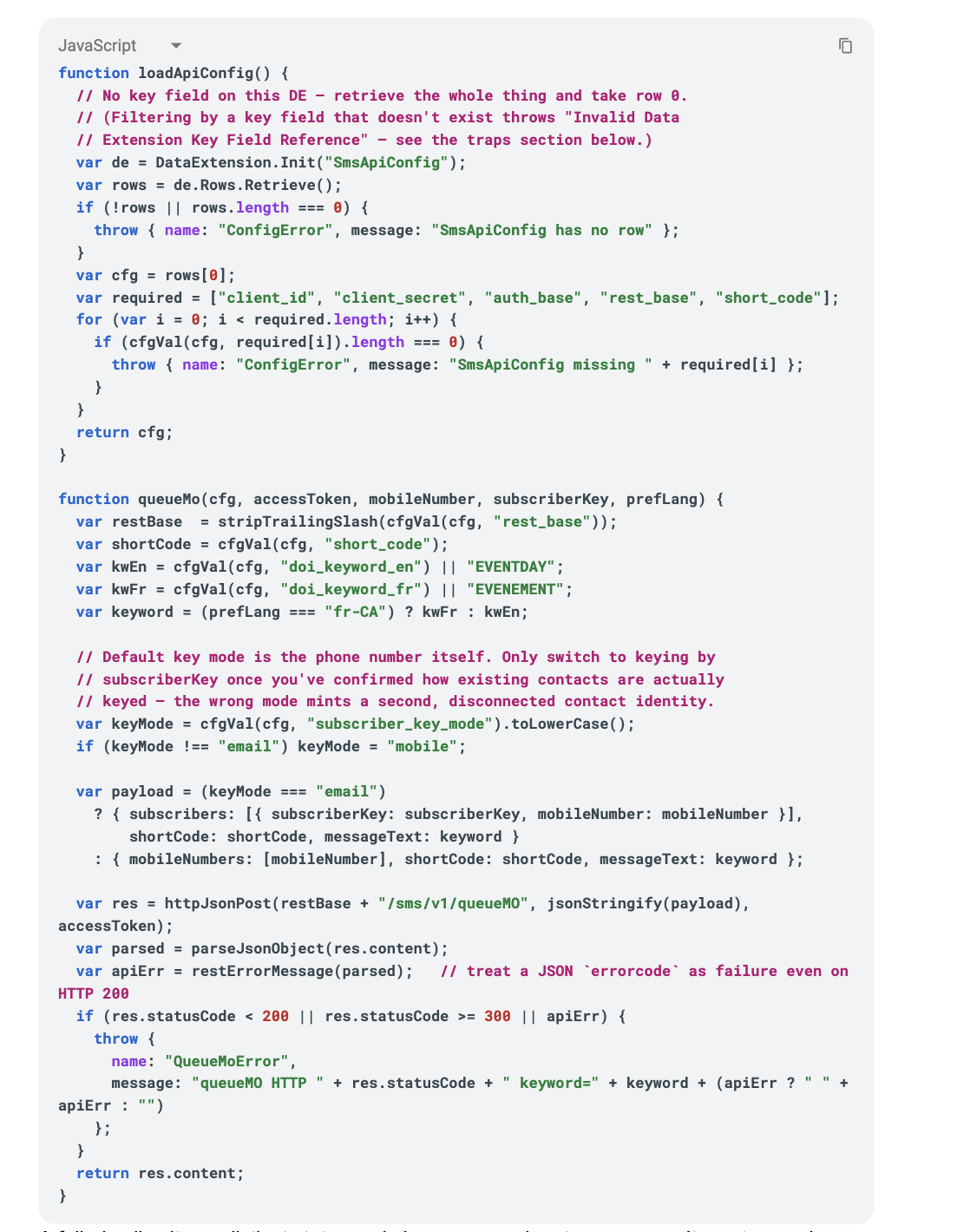
The CloudPage’s own job is small: validate the submission, log consent (never treat it as a subscription), then fire the token + QueueMO calls server-side. Here’s the config loader and the QueueMO call itself, lightly genericized from the real Code Resource:
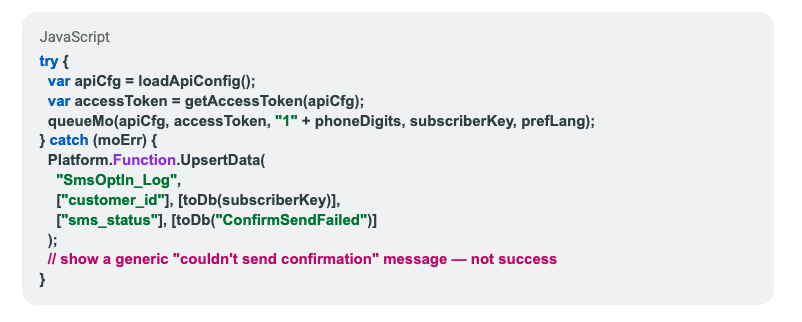
A failed call writes a distinct status and shows a generic retry message. It must never be allowed to look like a successful opt-in:
The sneaky gotcha: there’s no webhook for the YES
MobileConnect does not emit an event when someone replies YES to a Double Opt-In prompt. No callback, no push. If your own consent record is going to reflect reality, you need a scheduled mirror. Here’s an example of what that hourly query might look like:
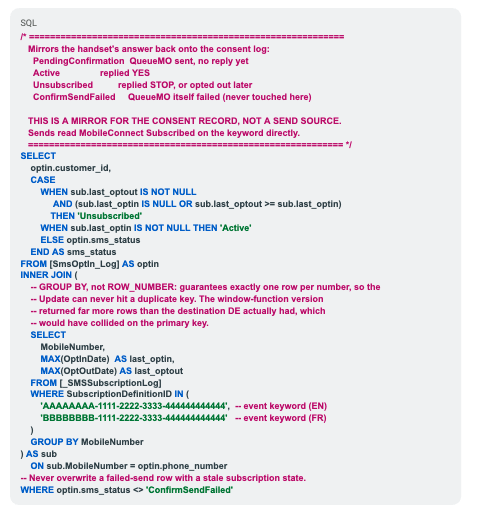
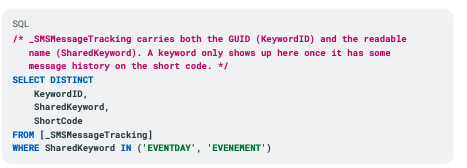
_SMSSubscriptionLog only identifies a keyword by GUID, never by name, so that SubscriptionDefinitionID IN (…) list has to be hardcoded, and it fails silently if a keyword is ever rebuilt instead of edited in place.
The lookup that resolves name → GUID:
Other traps that cost real debugging time
None of these are QueueMO-specific, but they’re common Marketing Cloud REST/SSJS traps that happen to surface hard the first time you build something like this:
- A config DE with no natural key throws an unhelpful “invalid data extension key field reference” if you try to filter on a field that isn’t actually there. Retrieve the whole DE and take row 0, as above.
- invalid_client on the token call usually means the config row points at the wrong Installed Package, not that anything about the SMS call is broken. Get the token working in isolation first.
- Check the JSON body, not just the HTTP status. SFMC’s REST APIs frequently return HTTP 200 with an errorcode in the body, which is what restErrorMessage() above exists to catch.
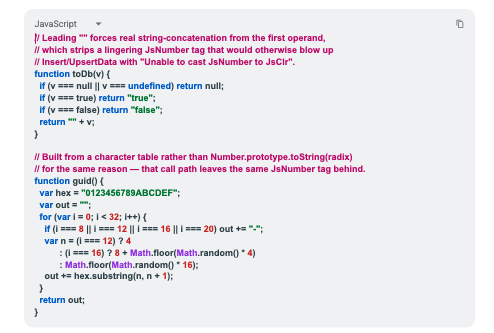
- Jint (SFMC’s SSJS engine) has sharp edges. String.prototype.trim isn’t implemented, and values can stay internally tagged as a JsNumber even after you think you’ve stringified them — which the CLR bridge behind Insert/UpsertData then rejects outright:
- Client IP capture from a CloudPage is unreliable. Common forwarding headers are frequently blank depending on the request path. Don’t design a compliance record that depends on capturing IP, a timestamp, a logged consent statement, and the handset’s own YES reply are the stronger evidence trail anyway.
The bottom line: only the phone can prove the phone
A web form cannot prove someone owns a phone number; only a reply sent from that phone can. QueueMO’s entire value is that it lets you keep collecting numbers from a web page while routing every compliance-bearing decision through the SMS channel that can actually verify possession, using keyword infrastructure an aggregator has already approved. The cost of getting this right is small: a server-side API call, a Double Opt-In template, and a scheduled job to mirror a state that arrives with no webhook. The cost of getting it wrong is a suspended short code and a halted campaign – so let’s get it right the first time.