

Eight months ago, I joined Ateko at a time when the Salesforce ecosystem was clearly shifting. As our focus expanded toward automation and deeper platform collaboration, one trend became impossible to ignore, demand for Salesforce B2B Commerce on Core is growing fast, and experienced SFCC (Demandware) developers are getting trained on B2B.
If you’ve spent years working in Business Manager, ISML, pipelines, and cartridges, B2B Commerce on Lightning can feel unfamiliar at first. The tools are different. The terminology is different. The architecture is very different.
But here’s the important part: your commerce mindset still applies.
You already understand catalogs, pricing, customers, checkout flows, and integrations. What’s changing is not what you build, but where and how you build it. This transition is not a reset. It’s an upgrade!
B2C vs. B2B – The Technical Cheat Sheet
One of the biggest mental blocks in this transition is thinking everything is new. In reality, most concepts already exist, they just live in different places.
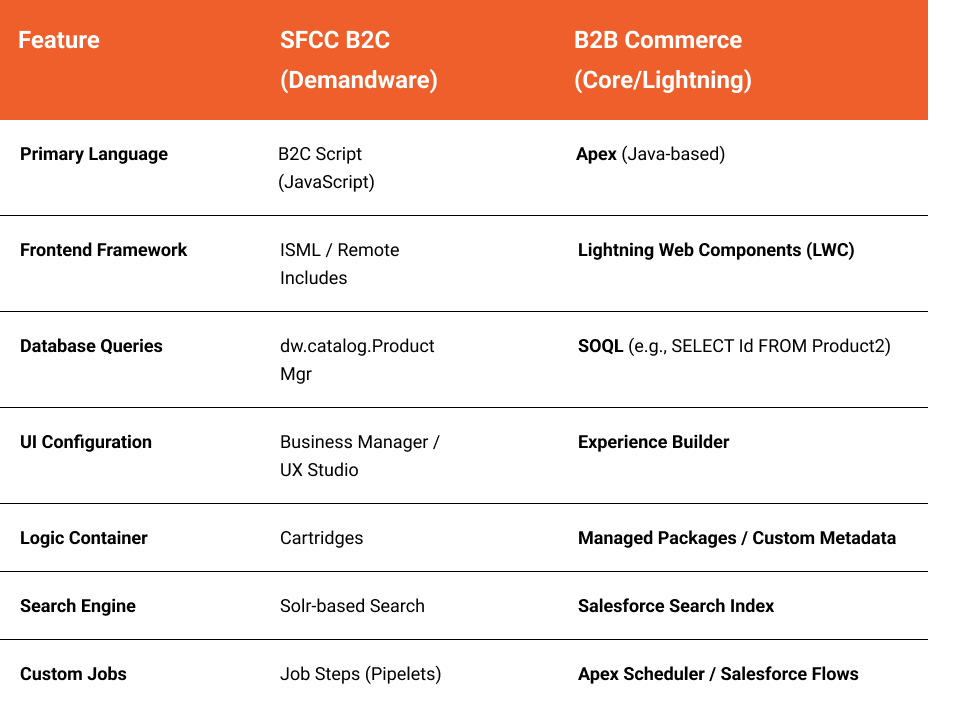
Architectural Reality Check (B2C vs B2B)
In B2C, the storefront is its own world. In B2B, the storefront lives inside Salesforce. That difference affects everything.
Data Model Comes First
In B2B Commerce, your storefront runs on top of the CRM data model.
- Customers are Accounts and Contacts
- Products are Product2 records
- Prices, entitlements, and visibility are all driven by Salesforce data and sharing
You cannot build effective B2B features without understanding how Salesforce handles records, relationships, and access.
Experience Cloud Is the Storefront
B2B storefronts are built using Experience Cloud. If SiteGenesis or SFRA were your entry point in B2C, Experience Builder fills that role here — but with far more emphasis on configuration and security.
Security Is Not Optional
In SFCC, data visibility is mostly controlled by site and catalog rules. In B2B, Salesforce sharing rules and permission sets determine what a user can see.
If a user does not have access to a record, it will not appear in the storefront. Full stop. Before writing code, invest time in understanding:
- Profiles and permission sets
- Record ownership and sharing
- Account hierarchies
Phase 1: Master the Core Platform
In the B2C world, we live in a standalone sandbox. In B2B, the storefront is part of the CRM brain.You cannot code effectively if you don’t understand how the platform handles data.
- The Data Model: Your Customer is now an Account, and your Product is a Product2 record.
- Experience Cloud: B2B storefronts are built on Experience Cloud. Think of this as the SiteGenesis for the modern world.
- Security: Master Permission Sets and Sharing Rules. In B2B, if a user doesn’t have Sharing access to a record, it won’t appear in the store.
Trailhead is genuinely useful here, especially for developers coming from outside the Salesforce Core world.
A solid admin foundation will make every B2B concept easier to understand.
Deep Dive: Admin Beginner Trail
Phase 2: The Coding Shift (LWC and Apex)
This is usually where imposter syndrome kicks in. It shouldn’t.
Lightning Web Components
If you’ve worked with PWA Kit or modern JavaScript, LWC will feel familiar. It’s clean, performant, and opinionated in a good way.
Key differences:
- Strong separation of markup, logic, and styling
- Data access is handled through Apex
- Salesforce handles lifecycle and security
Apex
Apex is strongly typed and closer to Java than JavaScript. It powers most of the backend logic in B2B Commerce.
You’ll use Apex to:
- Fetch and manipulate commerce data
- Interact with carts and checkout
- Integrate external systems
The ConnectApi namespace is especially important. Think of it as your replacement for many of the B2C server-side APIs you’re used to.
SOQL
Instead of manager classes, you query data directly.
If you’ve ever written SQL, SOQL will feel straightforward:
- SELECT Id, Name FROM Product2
Once this clicks, development becomes much more predictable
Deep Dive: Build Lightning Web Components
Phase 3: The Commerce Specifics (APIs & Search)
With the platform foundation in place, you can focus on B2B commerce features.
Entitlements and Pricing
B2B pricing is rarely one-size-fits-all. Entitlements allow you to:
- Show different products to different accounts
- Apply negotiated pricing
- Control availability by customer group
This replaces much of the custom pricing logic SFCC developers often write.
Commerce APIs
Cart, checkout, and order operations are handled through Commerce APIs exposed via Apex. These APIs are powerful, but opinionated.
Understanding how Salesforce expects commerce flows to work will help you extend them safely.
Search and Indexing
Search configuration lives inside Salesforce. You’ll manage:
- Indexed fields
- Rebuild schedules
- Search visibility rules
It’s less custom than Solr, but far easier to maintain..
Deep Dive: B2B Commerce Developer Guide
Essential Resources for your Transition
To get started, bookmark these three pillars of B2B learning:
- Trailhead – B2B Commerce for Developers: The official starting point for hands-on exercises.
- Salesforce Developers Center: The source of truth for API references.
- The Component Library: Before you build a custom LWC, check here to see if a base component already exists.